Model Checking
This section introduces the model-checking facilities provided by the Bigraph Framework and explains how bigraphical reactive systems can be systematically analyzed.
It first covers the specification of the reactive system and configuration of the model checker, then explains how the reachable state space is explored and controlled at runtime. Finally, it shows how the resulting reaction graph can be inspected programmatically and exported for further analysis or visualization.
Overview
In software engineering, formal verification is a technique for ensuring the correctness of programs using mathematical models and methods. Unlike traditional testing approaches, formal verification provides rigorous guarantees about a program's behavior by proving specific properties against a formal specification.
In this process, a program or a system (formulated as bigraphical reactive system) is checked against a set of correctness properties. A system is considered correct with respect to a given specification if the required properties hold for its formal model. This method is particularly valuable for developing safe and reliable software, as it can identify errors that might be missed by conventional techniques like unit testing.
One widely used formal verification technique is model checking, which systematically explores the reachable state space of a system to determine whether specified properties hold. This functionality is integrated into the simulation module of Bigraph Framework.
Creating the Specification and a Model Checker
Bigraphical Reactive System (BRS)
A BRS is a model of a system or system specification containing an initial host bigraph and a collection of reaction rules.
In category-theoretic terms, BRSs are defined as syntactical categories endowed with a set of reaction rules.
Specifically, a concrete BRS is a s-category  containing a signature and a set of rules.
All reactive system implementations extend the interface org.bigraphs.framework.core.reactivesystem.ReactiveSystem<B extends Bigraph<? extends Signature<?>>> of the Core Module in Bigraph Framework.
Creating a BRS by Instantiation
A reactive system for pure bigraphs can be created by calling its constructor as follows:
PureReactiveSystem reactiveSystem = new PureReactiveSystem();
Then, an initial bigraph and reaction rules can be added like this:
// Set the initial agent
PureBigraph agent = ...;
reactiveSystem.setAgent(agent);
// Add a reaction rule
ReactionRule<PureBigraph> rr = ...;
reactiveSystem.addReactionRule(rr);
In the bigraph theory, an agent is any ground bigraph, i.e., a bigraph that has no sites and inner names. It must also be prime, i.e., it must have only one root.
In Bigraph Framework, an agent is generally referred to as a state of a system.
An exception will be thrown if the rules or the initial state are not in the correct format.
- Predicates as used in model checking for reachability checking can be added using the method
PureReactiveSystem#addPredicate(ReactiveSystemPredicates<B> predicate). - See also here on how to create predicates.
Creating a BRS by Inheritance
Inheriting a reactive system implementation allows for an object-oriented approach to better organize and manage domain-specific BRSs in an application.
The following example defines a BRS that can compute the sum of two integers, which are represented in bigraphs in unary form. In this form the symbol S is used to denote successor, and Z to mean zero. For example, the number 2 would be writing as S.S.Z.
import org.bigraphs.framework.core.reactivesystem.*;
import org.bigraphs.framework.simulation.matching.pure.*;

public class AddExpr extends PureReactiveSystem {

    public AddExpr(int a, int b) throws Exception {
        setAgent(createAgent(a, b));
        addReactionRule(createReactionRule_1());
        addReactionRule(createReactionRule_2());
    }

    // Custom extended method of this reactive system specification that allows execution
    public PureBigraph execute() throws Exception {
        // Instantiate a matcher
        AbstractBigraphMatcher<PureBigraph> matcher = AbstractBigraphMatcher.create(PureBigraph.class);
        // Get the current state
        PureBigraph agentTmp = getAgent();

        // ...
        // apply rules according to some strategy or randomly
        // ...

        // Return the final state
        return agentTmp;
    }
}
The concrete methods AddExpr#createAgent(), AddExpr#createReactionRule_1() and AddExpr#createReactionRule_2() are omitted in this example for clarity.
Creating the Model Checker
This code example shows how to create a model checker object for pure bigraphs:
import org.bigraphs.framework.core.reactivesystem.*;
import org.bigraphs.framework.simulation.matching.pure.*;
import org.bigraphs.framework.simulation.modelchecking.*;

// Create a pure reactive system container
PureReactiveSystem reactiveSystem = new PureReactiveSystem();

// Add an agent (the initial state) and reaction rules (logic)
/* code omitted */

// Create model checking options
ModelCheckingOptions opts = ModelCheckingOptions.create();

// Create the pure bigraph model checker
PureBigraphModelChecker modelChecker = new PureBigraphModelChecker(
        reactiveSystem,
        BigraphModelChecker.SimulationStrategy.Type.BFS,
        opts
);

// Execute model checking synchronously.
// This call blocks until exploration terminates.
modelChecker.execute();
Some remarks:
- The
execute()method blocks until the exploration terminates and may throw aBigraphSimulationException. - For non-blocking execution, use
executeAsync(), which returns aFuturecontaining the resulting reaction graph; see Asynchronous Execution. - The executor used for model-checking tasks can be customized through an
ExecutorServicePoolProvider; see Custom Executor Service. - State-space exploration strategies are covered here and are selected using
BigraphModelChecker.SimulationStrategy.Typewhen constructing the model checker. - Model checking options are explained here.
Asynchronous Execution
To perform the model checking asynchronously, call the BigraphModelChecker#executeAsync():
import org.bigraphs.framework.core.impl.pure.*;
import org.bigraphs.framework.core.reactivesystem.*;

Future<ReactionGraph<PureBigraph>> reactionGraphFuture = modelChecker.executeAsync();
ReactionGraph<PureBigraph> pureBigraphReactionGraph = reactionGraphFuture.get();
The executeAsync() method does not block the execution and returns a Future object to fetch the result later.
It contains the complete reaction graph of the simulated BRS.
Custom Executor Service
The java.util.concurrent.ExecutorService is used to submit tasks of the model checker.
Bigraph framework offers to provide a custom ExecutorService by implementing the interface
org.bigraphs.framework.core.providers.ExecutorServicePoolProvider, found in the bigraph-core dependency.
The class BigraphModelChecker uses the java.util.ServiceLoader (see https://docs.oracle.com/javase/tutorial/ext/basics/spi.html#the-serviceloader-class
to search for an implementation.
A default executor service provider is provided within the bigraph-simulation module,
which creates a fixed thread pool.
Therefore,
refer to org.bigraphs.framework.simulation.modelchecking.FixedThreadPoolExecutorProvider.
State-Space Exploration
The model checking procedure implemented in Bigraph Framework is especially suited for so-called reachability checking.
This topic is covered in Bigraphical Predicates.
The framework builds the reaction graph in the course of model checking or simulation. Only the canonical form of a bigraphical state is stored in the reaction graph to minimize the state-space explosion problem.
Specifically, a directed model-checking technique is employed. Refer to [1], [2], [3].
Note that state-space exploration may not terminate for systems with infinite behavior. Appropriate stopping criteria should therefore be configured.
Breadth-first Traversal
Breadth-first traversal explores the reachable state space level by level, starting from the initial agent. All states reachable in one reaction step are discovered first, followed by states at increasing transition distance from the initial state.
The respective reaction graph of this simple BRS example is shown below after the whole state space was discovered.
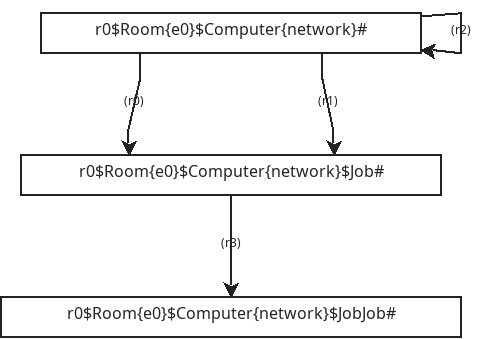

The two visualizations represent the same reaction graph, but use different state-labeling schemes:
- Left uses the canonical string encoding of each bigraph as the state label. This exposes the structural representation used internally to identify and compare states at a glance.
- Right uses a compact state-naming scheme such as
a_0,a_1, anda_2, which is more suited when inspecting larger systems.
The example uses three reaction rules:
- r0, r1 are two identical rules that apply only to the initial configuration in which the
Computercontains noJob. Each adds the firstJobbelow theComputer. - r2 is a self-application rule: its redex and reactum are structurally identical. It therefore leaves the state unchanged and produces a self-loop in the reaction graph.
- r3 applies once exactly one
Jobis present and adds a secondJob.
Depth-first Traversal
Depth-first traversal explores the reachable state space by following one successor path as far as possible before backtracking to the most recent state with unexplored alternatives.
DFS explores reachable states by following each path in depth rather than level by level, which can reduce memory overhead while still examining every global state reachable from a given initial state for a finite state space.
However, the order in which states are discovered differs from BFS, and the first path found to a state is not necessarily a shortest path.
Variations
For example, if rule r0 has n possible matches in state a_0, standard BFS or DFS may generate:
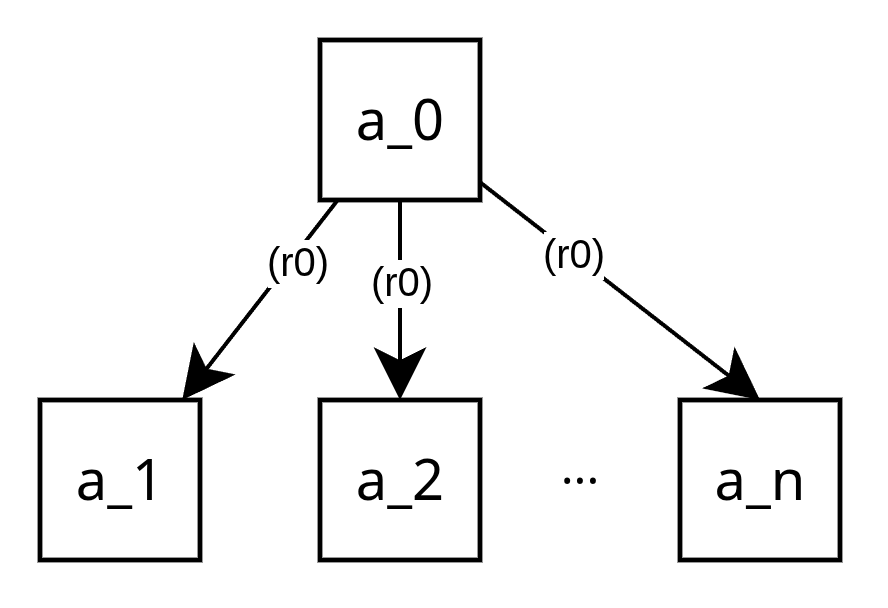
For breadth-first and depth-first exploration, the framework also provides the variants:
BigraphModelChecker.SimulationStrategy.Type.BFS_FIRST_MATCHBigraphModelChecker.SimulationStrategy.Type.DFS_FIRST_MATCH
Instead of expanding all matches of some rule, the model checker follows only the first match found for that rule application. This can substantially reduce branching in situations where one rule gives rise to many structurally similar successor states.
Random Simulation
Unlike exhaustive model-checking strategies, random simulation does not aim to discover every reachable state.
Starting from the initial agent, the simulator applies the available reaction rules, expands the reaction graph, randomly selects one successor state, and repeats the process. In this way, it follows a single randomly chosen execution path until no further rule can be applied or another stopping condition is reached.
Because only one path is explored at a time, random simulation does not guarantee complete state-space coverage or termination.
The two runs illustrate the non-deterministic nature of random simulation:
| Random Run #1 | Random Run #2 |
|---|---|
 | 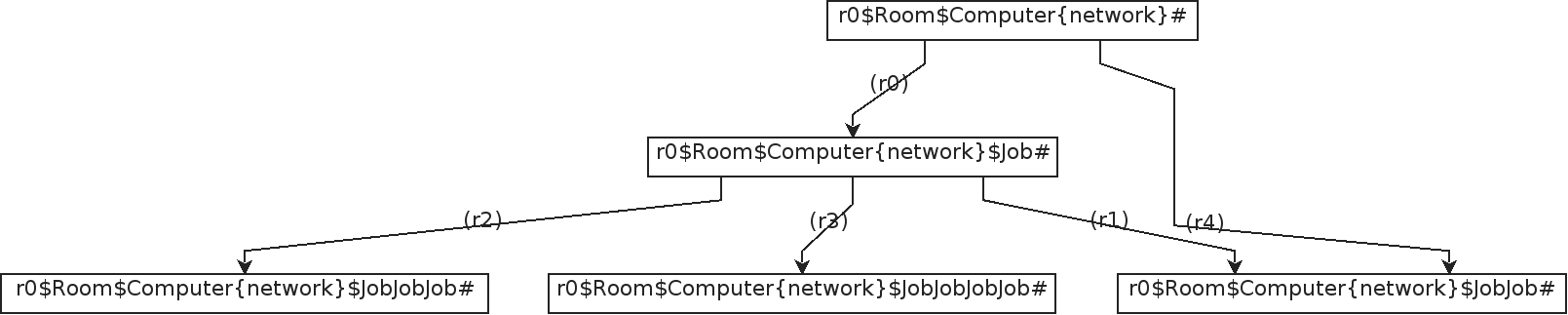 |
In Random Run #1, the initial agent has two possible successor states produced by rules
r0andr4. The simulator randomly selects the successor reached viar4. Since no further reaction rule is applicable to that state, the run terminates immediately.In Random Run #2, the simulator instead selects the successor reached via
r0. From this state, additional reaction rules become applicable, and the execution continues along a longer path before eventually reaching a terminal state.
These runs show that different random choices can lead to different execution paths (i.e., traces), even when starting from the same initial agent.
As shown in the figures, all successor states at the current level are expanded before the simulator randomly selects the next state to continue from.
Configuring and Controlling Execution
Model Checking Options
Model checking options may be provided to the model checker.
Therefore, the class ModelCheckingOptions needs to be created. An
example is shown below.
import org.bigraphs.framework.simulation.modelchecking.*;

ModelCheckingOptions opts = ModelCheckingOptions.create();
opts
        .doMeasureTime(true) // for debugging
        .setReactionGraphWithCycles(true)
        .and(transitionOpts()
                .setMaximumTransitions(100) // maximum transition count
                .setMaximumTime(100) // in seconds
                .allowReducibleClasses(true) // default: true
                .rewriteOpenLinks(false) // default: false
                .create()
        )
        .and(ModelCheckingOptions.exportOpts()
                .setReactionGraphFile(Paths.get("transition_graph.png").toFile()) // default: empty
                .setOutputStatesFolder(Paths.get("states/").toFile()) // default: empty
                .setFormatsEnabled( // output formats of states
                        List.of(
                                ModelCheckingOptions.ExportOptions.Format.PNG,
                                ModelCheckingOptions.ExportOptions.Format.XMI
                        )
                )
                .setPrintCanonicalStateLabel(false) // default: false
                .create()
        )
;
The individual options are divided into several categories which can be accessed by their respective builder classes. Currently, the following categories are available:
ModelCheckingOptions.TransitionOptionsModelCheckingOptions.ExportOptions
The ModelCheckingOptions.ExportOptions class allows specifying a file path where the reaction graph (i.e., transition system)
and the individual states shall be written to.
If these options are left empty then the graphs are not exported.
Also, one can decide if the state labels of the reaction graph are simple identifiers a1, a2, a3, ... or canonical string encodings of bigraphs.
Note that these canonical labels can be quite long for large states.
The following methods are available through the ModelCheckingOptions.transitionOpts() builder instance to adjust the canonical string encoding algorithm of bigraphs, which is used for cycle checking of the transition system:
TransitionOptions.Builder#allowReducibleClasses(bool)TransitionOptions.Builder#rewriteOpenLinks(bool)
Stopping Criteria
Notice that ModelCheckingOptions.TransitionOptions let us specify some stopping criteria by
acquiring its builder by calling ModelCheckingOptions.TransitionOptions.transitionOpts():
- Maximal Number of transitions to allow
- Time
The default values are good for most of the cases.
Stopping conditions can also be defined using bigraphical predicates, combined with event listeners and the requestStop() mechanism to terminate exploration when a desired condition is detected.
Requesting Termination
In addition to predefined stopping criteria such as a maximum number of transitions, an ongoing exploration can also be terminated programmatically. This is useful when termination depends on information that becomes available only during execution, for example when a desired state or predicate match is detected.
Therefore, the model checking strategy interface ModelCheckingStrategy exposes a requestStop() method.
Strategies, such as BFS, DFS, etc., implementing ModelCheckingStrategySupport integrate this mechanism into their exploration loop by checking an internal running flag:
while (
    isRunning &&
    !worklist.isEmpty() &&
    iterationCounter.get() < transitionOptions.getMaximumTransitions()
) {
...
}
Calling requestStop() clears this flag and therefore requests a graceful termination of the exploration once the current processing step has completed. It does not forcibly interrupt an ongoing rule match.
Monitoring Exploration with Event Listeners
One may listen to specific events that are thrown during model checking or a simulation. This gives the user the possibility to interact with the reaction graph and fire additional actions or to log these events and evaluate them later.
Therefore, the interface ReactiveSystemListener<B extends Bigraph<? extends Signature<?>>> must be implemented and added
to a model checker instance. It provides methods to listen when a reaction rule is applied or when the verification process finished, for instance.
Event listeners are covered in more detail in Bigraphical Predicates, including predicate evaluation, verification events, and reacting programmatically to events during state-space exploration.
Reaction Graph and Results
After model checking has completed or in-between, the generated reaction graph (i.e., transition system) can be obtained directly from the model checker:
ReactionGraph<PureBigraph> reactionGraph = modelChecker.getReactionGraph();
The ReactionGraph represents the explored state space and can be analyzed programmatically.
Reaction graphs can also be compared with respect to behavioral equivalence, for example by checking whether two transition systems are bisimilar.
For further processing or visualization, the reaction graph can be exported in different formats.
Inspecting the Reaction Graph
Typical operations include traversing execution traces, and inspecting states and transitions.
Exporting Results
The resulting reaction graph can be exported to the DOT format for further analysis, layout processing, or rendering with external graph-visualization tools.
DOTReactionGraphExporter exporter = new DOTReactionGraphExporter();

// Export as a DOT string
String dot = exporter.toString(modelChecker.getReactionGraph());

// Export directly to a file
try (FileOutputStream out = new FileOutputStream("reaction_graph.dot")) {
    exporter.toOutputStream(modelChecker.getReactionGraph(), out);
}
When the corresponding model-checking export options are configured, PNG export is performed automatically after exploration.
The reaction graph can also be exported directly as a PNG image. For further details, refer to Visualization
References
[2] G. Perrone, “Domain-Specific Modelling Languages in Bigraphs,” IT University of Copenhagen, 2013.
[4] Milner, Robin: The Space and Motion of Communicating Agents. 1st ed. New York, NY, USA: Cambridge University Press, 2009. ISBN 978-0-521-73833-0.